
Appearance
Healthcare Scribe — Integration Demo
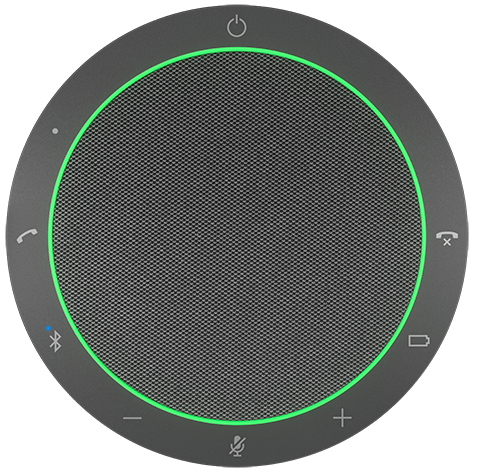
This demo setup explores how a Jabra Speak2 device can elevate a PC-based healthcare scribe system from a passive recording tool into something that feels natural and present in the consultation room. A recommended integration covers two distinct aspects:
- Visible, in-the-room control of the scribe for the clinician and patient.
- Remote Device Management for the IT admins who provision and maintain the Jabra devices.
Visible, in-the-room control of the scribe
The key idea: the Speak2's physical buttons and LED ring give both the clinician and patient tangible, at-a-glance control over the AI scribe — no screen interaction required.
The experience
A typical consultation with the Speak2-integrated scribe flows through four stages, combining preparation in the clinician app with simple controls in the app and on the device:
1
Preparing the consultation
The clinician prepares the consultation - identifies the patient and ensures all necessary information is ready before starting the session.
2
Starting the consultation
The clinician turns to the patient and starts the consultation. The Speak2 device provides immediate visual feedback through its LED ring, indicating that the scribe is active.
3
Going off-the-record
A single button press pauses the scribe. The LED ring shifts to a steady red glow, making it immediately clear that recording has stopped. Another press resumes scribing and the green light returns.
4
Ending the consultation
When over, the clinician ends the consultation. The LED ring fades off, confirming that the scribe is no longer listening. The scribe agent is notified of the end of the session.
AI Scribe
Idle
Ready to setup new consultation...
Why this matters
Traditional scribe systems rely on on-screen controls — small buttons in a software UI that are easy to overlook and disruptive to use during a face-to-face conversation. By mapping scribe control to a physical device that sits between the clinician and patient, the Speak2 integration achieves several things:
- Transparency — The LED ring is visible to both parties at all times. There is never a question about whether the AI is listening.
- Trust — The patient can see the state change the moment the clinician pauses recording. Off-the-record truly means off-the-record.
- Presence — The clinician stays engaged in the conversation instead of turning to a screen to toggle recording. A quick button press is all it takes.
- Simplicity — Less training required. Yellow means good-to-go, green means on, red means private, off means done.
Device management (admin)
Beyond the consultation room, an IT admin needs to keep every Speak2 device in the clinic configured, healthy, and up to date. This is a separate concern from the in-consultation controls above, and can be addressed either by a partner-built management tool or by relying on Jabra's own software:
- Consistent settings — Ensure every device is configured the same way across all consultation rooms, so the scribe experience is predictable for every clinician and patient.
- Device overview — Get a real-time inventory of which devices are deployed, where, and their current status.
- Firmware updates — Push firmware updates remotely to the whole fleet, without visiting each device in person.
This can be built by the partner or by relying on Jabra software products like Jabra Plus Management.
How these integrations can be built
The consultation experience and the device management capabilities can be developed as either an installed desktop application or a solution that runs directly in a web browser — no installation required. Jabra provides SDKs and tools to support both approaches, including the Jabra JavaScript SDK, the Jabra .NET SDK, and JabraCLI.